
November 30, 2022. The date when OpenAI launched its Artificial Intelligence (AI) model for the public as a research preview, named ChatGPT. It quickly gained popularity among users and became the fastest adopted tech invention in human history.
However, we’re not here to talk about ChatGPT today. Instead, let’s focus on its competitor. One whose latest AI model reportedly put OpenAI on code red. Yes, I’m talking about Google Gemini.
With the Gemini 3 Pro series, Google has significantly improved its image generation capabilities, internally codenamed Nano Banana Pro. While image generation is a powerful feature on its own, in this article, I’ll highlight five practical use cases of Google Gemini that go beyond just creating images.
1. Content & Report Summarization
One of the earliest and most practical features introduced by Gemini and modern AI in general was the ability to summarize long, complex, and often boring content or reports. This is a feature I’ve personally found extremely useful.
Back in December 2024, my laptop suddenly shut down. After some troubleshooting, I discovered that the battery management system wasn’t functioning properly. To investigate further, I generated a battery report using CMD and gave it a read myself. While I could understand most of the technical details, someone who isn’t very tech-savvy would likely struggle to pinpoint the actual issue.
To make things easier, I shared the report with Gemini and asked it to analyze the problem. It quickly identified inaccuracies in the charge capacities of both of my laptop’s batteries. Not only did Gemini highlight what was wrong, but it also explained the report in a much more detailed and understandable way.
2. English Learning Instructor
AI tools work exceptionally well with the English language. If you’re someone looking to improve or polish your English, this might be the best time to do so.
Please note: I strongly recommend learning English through a proper language institution whenever possible. Language learning isn’t just about memorizing words or forming sentences. It’s about communication, confidence, and overcoming the fear of expressing yourself in front of others. That’s what I have learned by going to an institution myself.
That said, if you want to further refine your English skills, Gemini can be a helpful companion. It can introduce you to new vocabulary, help polish your writing, identify grammatical errors, and even encourage more thoughtful and creative expression. The live chat feature can also sharpen your listening skills, as it mimics a one-on-one conversation.
3. Content Writing Coach
Creating content has never been easier. While AI has undeniably opened the door to mass-produced and low-quality content across the internet, it can still be a powerful assistant when used correctly.
Instead of relying on AI to produce a finished piece, use it as a support tool to refine and enhance your work. Focus on creating original content first, then let AI help you improve structure, clarity, and presentation. You can also ask for insights into what others are doing in the same niche and identify gaps where your content can add real value for readers.
4. A Point of Inspiration
Gemini AI can also serve as a strong source of inspiration. You might have a creative idea or a project in mind, but struggle to define its direction or design clearly. Gemini can help you explore your thoughts in more depth and refine them into something concrete.
Instead of searching aimlessly on Google, you can use Gemini to narrow down relevant information based on context, making it easier to reach meaningful results faster.
Tip: Be as detailed as possible when framing your queries. The more context you provide, the better Gemini can understand your intent and deliver accurate responses.
Also Read: Is Grammarly still worth it in the age of AI?
5. Deep Research & Dynamic View
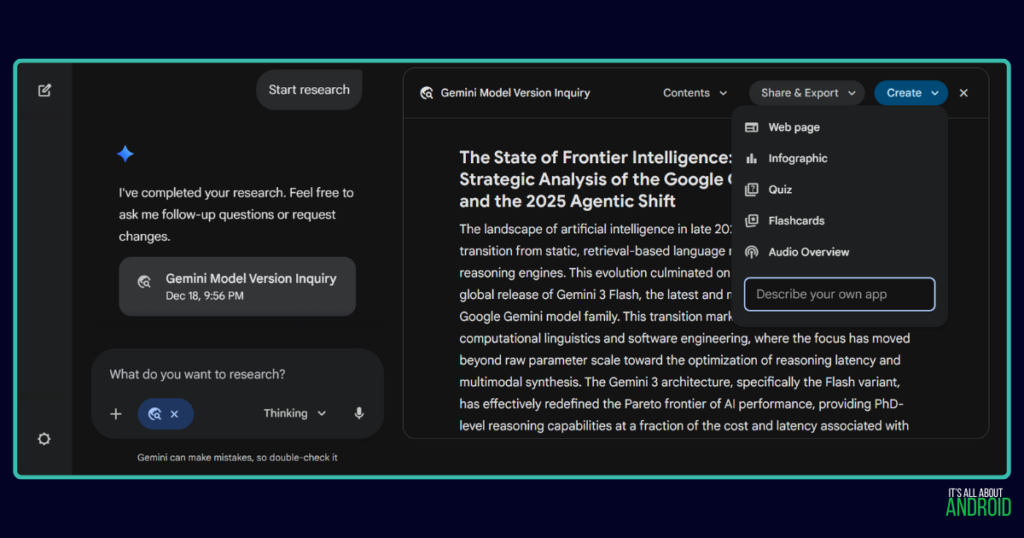
The Deep Research tool, now referred to as an agent in Gemini 3, provides detailed, search-based reports complete with proper citations. These reports can then be used as a foundation to create additional content, such as audio overviews, infographics, web pages, and more.
The dynamic view agent is the latest installment in the Gemini AI chatbot. And here is the definition Gemini provided to me.
“In the context of modern AI (like Google’s Gemini), a Dynamic View is an interface generated in real-time by the AI. Instead of just answering with text, the AI writes code to build a custom interactive tool, chart, or widget specifically for your query.”
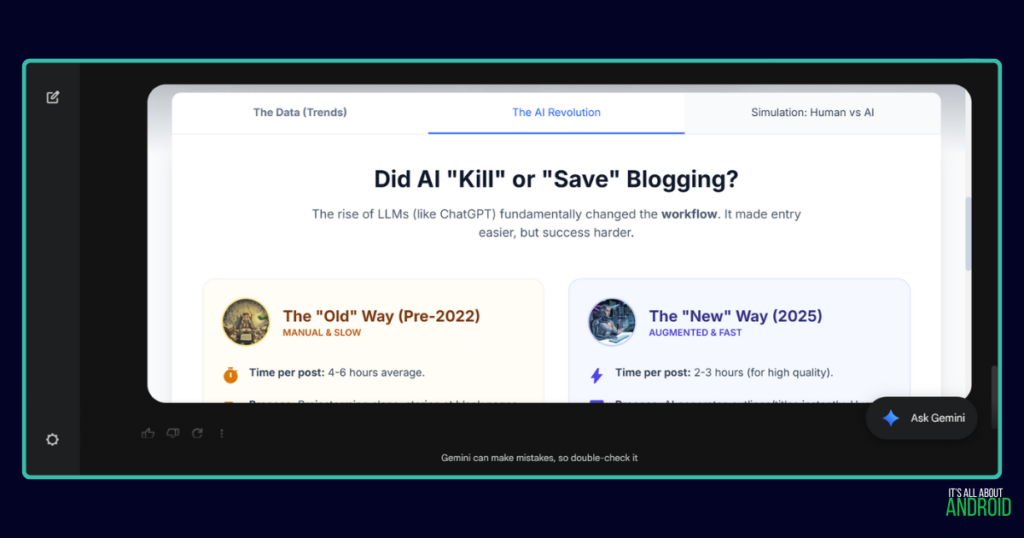
It’s similar to the canvas tool, but you do not get any access to the code of the design. Hence, it’s only for viewing. You can play with this tool and get some ideas about using it practically for your own needs. Again, remember to be as specific as you need for Gemini to better understand your queries.
What Gemini Is Not
After discussing the positives, it’s important to address Gemini’s limitations. Like all AI chatbots, you’ll often see a disclaimer stating: “Gemini can make mistakes, so double-check it.” This is crucial advice. All AI models can hallucinate or provide inaccurate information, especially when used carelessly. AI is still far from perfect—for now.
Another growing concern is the emotional attachment people are forming with AI chatbots. Some begin to see them as friends or emotional companions who understand them better than real people.
Please remember: AI chatbots are not your friends. They do not have emotions or understanding. They are simply large language models running on computational systems. Instead of investing your emotions in AI, prioritize building real connections with your friends and family.
With all that said, what feature of Gemini AI do you find the most useful? Have you used AI in any other practical way? Share your experience in the comments below. It really helps.